
IPTV USA 2026: How to Choose the Best IPTV Service in the USA
IPTV USA simply means IPTV services used by viewers in the United States: live TV and on-demand content delivered over your home internet instead of a cable box or satellite dish. The hard part is not understanding the technology. It is choosing an IPTV subscription that actually stays stable on a Tuesday night in November, works on the devices you already own, and has terms you understand before you pay.
This guide walks you through that decision: what to compare between IPTV providers, what to test during a trial or a first short plan, when 4K is worth it, how Firestick and Smart TV setups work, and why streams buffer.
- HD, Full HD & 4K listed
- Fast delivery
- Multi-device setup
- WhatsApp & email support

Transparency note: this guide is published by Mediaspelare, which operates an IPTV subscription service. The buying criteria below are intended to help readers compare IPTV services generally. It is not an independent review of Mediaspelare or of any other provider, and we have not run lab tests against competitors.
What Is IPTV?
IPTV (Internet Protocol Television) is television delivered over an internet connection instead of over cable, satellite or an antenna. A provider sends live channels and on-demand content as data streams, and an app on your TV, streaming stick, phone or computer turns those streams into the picture you watch.
You already use the same basic idea every time you open a streaming app. The difference is that IPTV usually refers to services built around live channels arranged like a traditional TV lineup, with a program guide, channel groups and often a video-on-demand library alongside.
Because the signal travels over the internet, the quality of your experience depends on three things working together: the provider’s servers, the app you use to watch, and your own home network. Most of this guide is about judging those three things before you commit money.
What Does IPTV USA Mean?
“IPTV USA”, “USA IPTV”, “IPTV in USA” and “IPTV United States” all describe the same thing: IPTV services used by viewers located in the United States. It is not a separate technology or a special American version of IPTV. The streams, apps and login formats are the same ones used everywhere.
What changes from country to country is the practical side. US viewers care about performance in their own time zone, especially during prime time on the East and West Coasts, about program guide times that match their local schedule, about the devices that are common in American homes (Fire TV, Roku, Samsung and LG televisions, Google TV and Apple TV), and about how the service behaves on typical US home internet, whether that is cable, fiber, DSL or fixed wireless. If you are outside the US, our guide to IPTV options for viewers in the UK covers the same decision from a British perspective.
How Does an IPTV Service Work?
An IPTV service works in five steps: the provider hosts the streams, an IPTV player app reads your login, your device runs that app, your internet connection carries the data, and your screen displays the result. If any one link is weak, you notice it as buffering, slow channel changes or a soft picture.
- 1. Providerhosts the channels, guide data and your account
- 2. IPTV playerthe app that reads your login and shows the lineup
- 3. DeviceFire TV, Smart TV, phone, computer or box
- 4. Internetyour home connection and Wi-Fi or Ethernet
- 5. Displaythe TV or screen you actually watch on
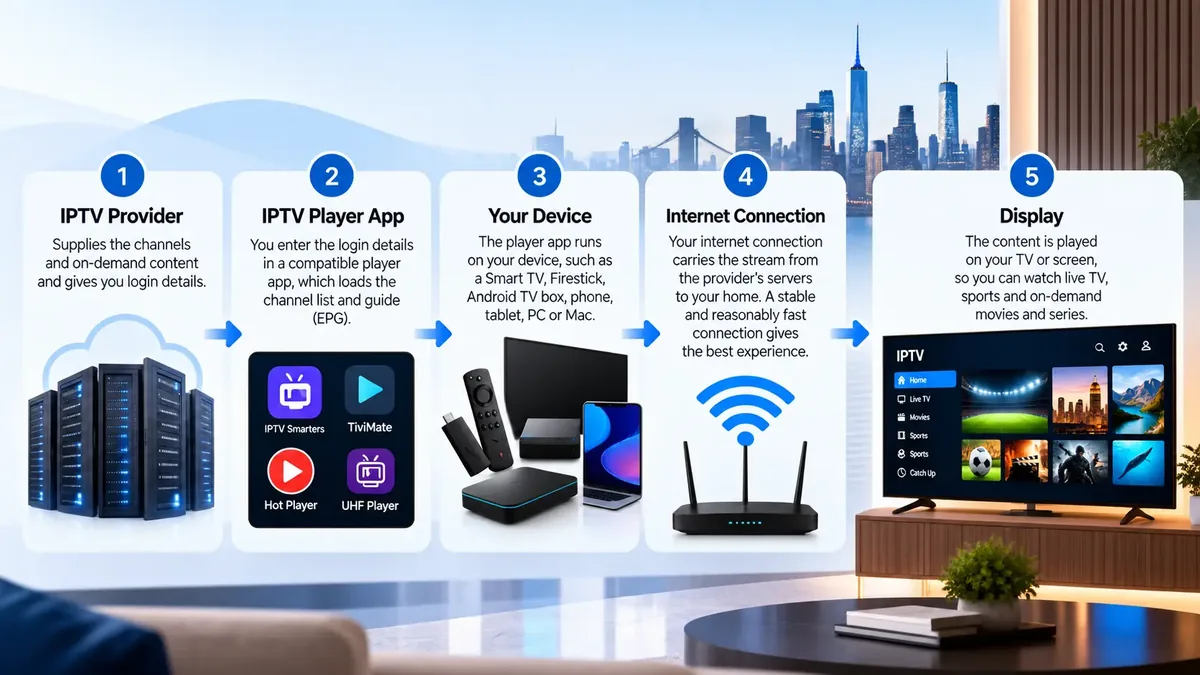
The useful takeaway is that the provider and the player are two different things. When a channel will not load, the cause may be the provider’s server, but it can just as easily be an outdated app, a streaming stick that is running out of memory, or a router in the far corner of the house. Knowing the chain helps you find the weak link quickly instead of assuming the whole service is bad.
IPTV Services: What Should You Look For?
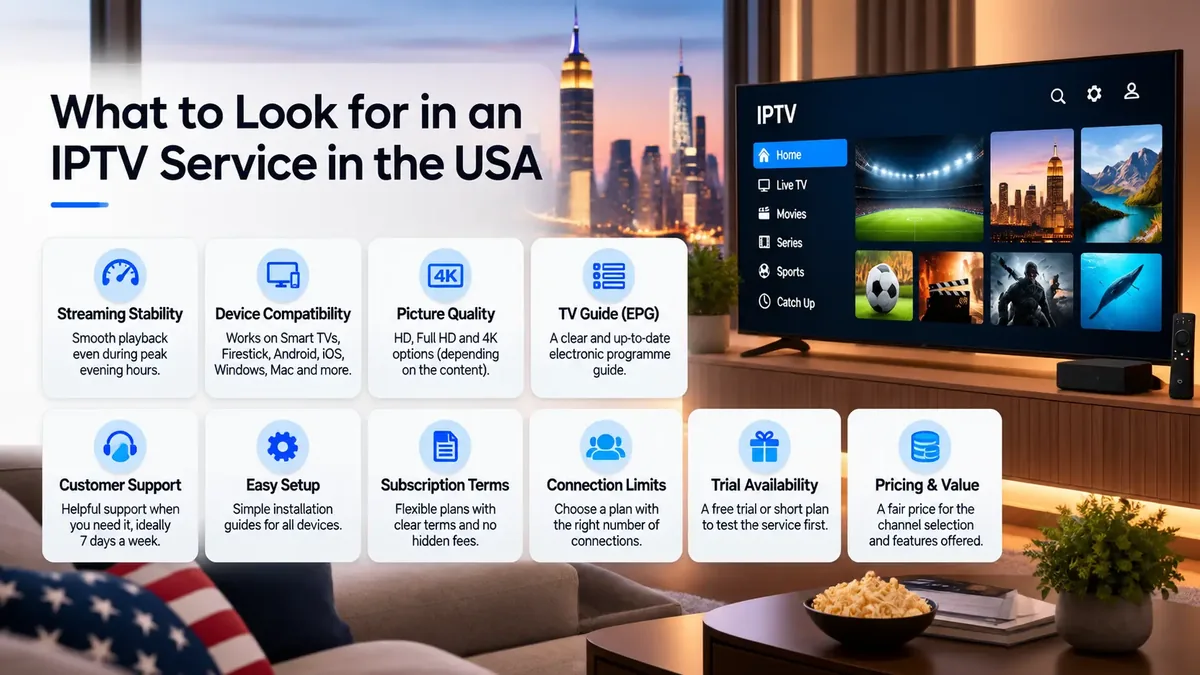
A good IPTV service is one that stays stable at the times you actually watch, works on your devices and preferred player, delivers the picture quality it advertises, includes an accurate program guide, and comes with clear terms and reachable support. Channel count matters far less than most sales pages suggest.
Before comparing prices, it helps to know what a solid service looks like in everyday use. These are the ten areas worth checking with any provider.
Streaming stability
Channels should open quickly and keep playing during busy evening hours, not only at 10 a.m. on a weekday.
Device compatibility
It should work on the TV, stick or phone you already use, with setup instructions for each.
Picture quality
HD and Full HD should look clean. 4K should be real 4K on channels that offer it, not an upscaled label.
EPG
A program guide that is filled in, matches your time zone and lines up with the right channels.
Customer support
A named way to reach a person, such as chat or email, and realistic response times.
Setup
Clear login details and guides for your device, plus help if you get stuck.
Subscription terms
A readable refund policy and plan description before you pay, not after.
Connection limits
How many screens can stream at the same time on one plan.
Trial availability
Whether you can test first, either with a trial or a short first plan.
The tenth factor is pricing, and it only makes sense once the other nine are covered. A low monthly price is good value when the service is stable and the terms are fair. It is poor value when you spend your evenings restarting apps. We look at how to weigh price against reliability later in this guide.
How to Choose the Best IPTV Service in 2026
The best IPTV service in 2026 is the one that fits how your household watches: stable during your peak hours, compatible with your devices and player, with an accurate guide, enough simultaneous connections, a sensible plan length and support you can reach. There is no single “best IPTV” for everyone, so judge services against your own checklist.
Search results for “best IPTV” or “best IPTV USA” are full of rankings, but a ranking tells you little unless you know how it was made and whether the author sells one of the services. A more reliable approach is to decide what matters to you and test against it. Here is how to think about each factor.
Streaming Stability
Stability is the difference between a service you forget about and one you fight with. Pay attention to how long a channel takes to start, whether streams freeze after twenty or thirty minutes, and whether performance drops at 8 p.m. Eastern when demand across the country is highest. A service that is flawless in the afternoon but struggles every evening is not a good fit for most households.
Device Compatibility
Make a short list of every screen you plan to use: the living room TV, a Fire TV Stick in the bedroom, a phone for travel. Then check the provider supports each one and has setup instructions for it. Some platforms, such as Roku, are much more limited for IPTV players than others, so it is worth confirming in advance rather than discovering it after you pay.
Player Compatibility
Most IPTV services let you choose your own player app. If you already like a particular app, confirm the service provides a login format that app supports, usually Xtream Codes or an M3U link. If you are new to IPTV, a provider that recommends specific players and explains how to set them up saves time.
EPG
A good electronic program guide makes IPTV feel like normal TV. Check that the guide shows current and upcoming programs for the channels you watch, that times match your time zone, and that the listings actually belong to the right channel.
Support
Every service has occasional problems. What matters is how quickly you can reach someone and whether they can help. Look for a clear contact method, a published FAQ and a refund policy you can read before buying.
Subscription Length
Longer plans usually cost less per month, but they commit you for longer. A short first plan is often the smarter move until you know the service works in your home.
Connection Limits
If two or more people in your home watch different things at the same time, you need a plan with enough simultaneous connections. This is one of the most common sources of frustration, and we explain it in detail in the multiple devices section.
Trial Availability
A free trial is useful when one is offered, but it is not the only way to test. A one-month plan does the same job over a longer, more realistic period. Either way, the goal is to try the service in your real conditions before committing to a year.
IPTV Service Providers: What Should You Compare?
When comparing IPTV service providers in the USA, look past the headline channel count. Compare evening stability, supported devices and login formats, guide accuracy, simultaneous connections, plan lengths, refund terms, delivery time and how you contact support. Write the answers down for each provider so you compare like with like.
Most IPTV providers in the US market describe themselves in similar terms, so the useful comparison happens in the details. The checklist below turns vague marketing language into questions you can actually answer, either from a provider’s website or by asking their support team before you buy.
| What to compare | Question to ask | Why it matters |
|---|---|---|
| Evening performance | Does it hold up between 7 and 11 p.m. in my time zone? | Peak hours are when weak servers show their limits. |
| Devices | Are my TV, stick and phone all covered with setup steps? | Saves you buying new hardware or giving up on a screen. |
| Login formats | Do I get Xtream Codes, an M3U link, or both? | Decides which player apps you can use. |
| Program guide | Is there an EPG link, and does it match US times? | A missing or wrong guide makes browsing painful. |
| Picture quality | Which quality levels are offered, and on which channels? | “4K” on a sales page rarely means every channel. |
| Connections | How many screens can stream at the same time? | Prevents streams cutting out when two people watch. |
| Plan lengths | Is there a short plan I can start with? | Lets you test without a long commitment. |
| Refund terms | When is a refund possible, and when is it not? | Tells you what happens if it does not work for you. |
| Delivery | How are login details sent, and how quickly? | You should know what to expect after paying. |
| Support | How do I reach a person, and in what time frame? | Problems are easier to live with when help is reachable. |
A provider that answers these questions clearly on its own website is generally easier to deal with than one that avoids them. Be cautious with any US IPTV provider that promises “no buffering ever” or “every channel in 4K”, because no internet-based service can guarantee that across every home network.
IPTV Subscription USA: Monthly vs Longer Plans
A monthly IPTV subscription costs more per month but lets you test the service with little risk. Three, six and twelve-month plans lower the monthly equivalent, which makes sense once you know the service performs well in your home. For most people, the sensible order is short plan first, longer plan second.
When you buy an IPTV subscription in the USA, the plan length is usually the main thing you choose, because most providers offer the same features across all lengths. That makes the decision mostly about risk and value.
Short plans (1 month)
Highest price per month, lowest commitment. Ideal for checking evening performance, device setup and guide accuracy over several weeks of normal use, including weekends and big live events.
Longer plans (3–12 months)
Lower monthly equivalent and fewer renewals to manage. Best once you are confident the service suits your household, your devices and your internet connection.
Before you choose, read the refund policy. Many IPTV providers, including Mediaspelare, do not refund a change of mind after activation, or problems caused by a device that was not checked before purchase. That is exactly why testing on a short plan first is worth the slightly higher monthly price. A good IPTV subscription in the USA should never feel like a gamble, and no one should pressure you into a year upfront.
If you want to see how plan lengths and monthly equivalents compare in practice, Mediaspelare’s pricing page lists all four options side by side.
IPTV Free Trial 2026: What Should You Test?
If you get an IPTV free trial in 2026, use it to test the things that break most often: how fast channels load and switch, picture quality in HD and 4K, whether the program guide is accurate, how it performs during evening hours, and whether it runs smoothly on every device you plan to use. Contact support once, too, to see how quickly they reply.
Trials tend to be short, often a day or less, so go in with a plan rather than browsing randomly. The same checklist works if you start with a one-month plan instead of a trial.
- Channel loading – how long a channel takes to start playing
- Switching speed – how quickly you can move between channels
- Picture quality – sharpness, motion and color on your main TV
- EPG – correct listings and US time zone
- Evening performance – stability between 7 and 11 p.m. local time
- Device compatibility – every TV, stick and phone you will use
- HD / 4K – whether 4K channels are really 4K on your screen
- Navigation – how easy it is to find channels and on-demand titles
- Support response – send one question and time the reply
At the time of writing, Mediaspelare’s pricing page does not advertise a free trial. The shortest option is the one-month plan, which gives you several weeks to run the checks above in real conditions.
4K IPTV USA: Is 4K Worth It?
4K IPTV is worth it if you have a 4K TV, a 4K-capable streaming device, a fast and stable connection of roughly 25 Mbps or more, and you watch content that is actually produced in 4K. Without all of those, a well-encoded Full HD stream will often look better than a heavily compressed 4K one.
“4K” on a plan description means 4K is available, not that every channel is 4K. Most live TV in the US is still broadcast in HD, so a 4K label only helps on channels and events where the original source is 4K. Several factors decide what you really see:
- Source quality – the original broadcast has to be 4K
- Compression – heavy compression removes detail, especially in fast sports
- Device – your stick or box must decode 4K (HEVC)
- TV – a 4K panel, ideally with the correct picture mode
- Internet – enough steady bandwidth for one 4K stream
- Server performance – the provider must deliver that bitrate at peak hours
Here is a practical way to judge it. Pick a live sports channel, watch the same kind of scene in Full HD and in 4K, and pay attention to the grass, the crowd and fast camera pans. If the 4K version shows blocky patches or stutters while the Full HD version stays smooth, the Full HD stream is the better choice for that channel. Many viewers find a stable Full HD picture more enjoyable than an unstable 4K one.
IPTV on Firestick in the USA
Amazon Fire TV devices, including the Fire TV Stick, Fire TV Stick 4K and Fire TV Cube, are among the most common ways to watch IPTV in American homes. They are inexpensive, plug into any HDMI port and run most popular IPTV player apps.
The key point is the difference between provider and player. Your IPTV provider supplies the subscription and login details. The Firestick runs a player app, such as IPTV Smarters Pro or TiviMate, that uses those details to show the channels. Some players are available in the Amazon Appstore, while others are installed using the Downloader app. The Fire TV itself does not come with channels from an IPTV service.
- Install a compatible IPTV player on your Fire TV device.
- Open the player and choose the login type your provider supplied (usually Xtream Codes or M3U).
- Enter your details exactly as sent, then let the channel list and guide load.
- Test a few channels, then check the guide and settings before relaxing on the couch.
Rather than repeating a full tutorial here, our Fire TV and Firestick installation guide walks through each step with recommended players. On older or base-model sticks, a hardwired Ethernet adapter and clearing the app cache now and then can make a noticeable difference.
IPTV on Smart TV
Most modern Smart TVs sold in the US can run IPTV through an app, but how you do it depends on the TV’s operating system.
Samsung (Tizen)
Uses Samsung’s own app store. Install a compatible IPTV player, then add your login. Some players ask for a one-time activation using the TV’s MAC address or device key.
LG (webOS)
Works in a similar way through the LG Content Store. Choose a supported player and follow its activation steps.
Android TV
Found on many Sony, Hisense and TCL models. Offers the widest choice of players through Google Play.
Google TV
Built on Android TV, including Google’s own streaming devices, and supports the same player apps.
If your TV’s app store has limited options, a streaming stick or Android TV box plugged into the HDMI port is often the simplest fix. Mediaspelare’s Smart TV setup instructions cover Samsung, LG, Hisense and Vizio, along with the players that work on each.
IPTV Compatible Devices
One strength of IPTV is that you are not tied to a single box. The same subscription can usually be used on a wide range of devices, as long as a compatible player app is available.
- Smart TVs
- Fire TV devices
- Android TV
- Google TV
- Apple TV
- Android phones
- iPhone & iPad
- Windows PC
- Mac
- Compatible boxes
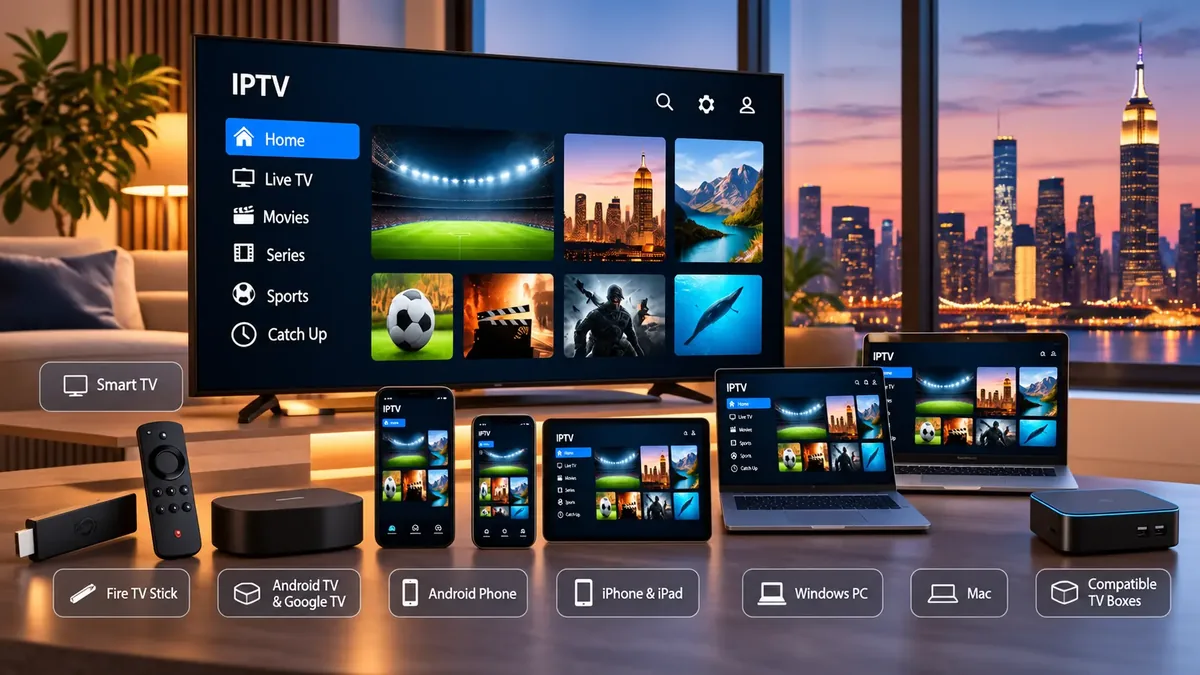
A few practical notes for US households. Apple TV, iPhone and iPad use players from the App Store, many of which are one-time paid apps. Windows and Mac can run desktop players or a media player that accepts M3U links. MAG and similar set-top boxes connect using a portal address rather than an app. Roku is the most limited option, because its store carries very few IPTV players and those that appear can be removed, so plan on screen mirroring or a separate stick if Roku is your main device. You can check device compatibility and setup steps for each platform in one place.
IPTV Players: Provider vs Player
An IPTV provider sells the subscription: the streams, the guide data and your login. An IPTV player is the app you install to watch: the menus, the channel list and the playback. The player does not supply any channels. It only displays what your provider’s login gives it access to.
Mixing these up is one of the most common beginner mistakes. People sometimes buy a player app expecting it to include TV, or blame a player for a problem that is really on the provider’s side, and vice versa. Keeping them separate also gives you freedom: if you dislike one app’s layout, you can switch to another and keep the same subscription.
| Player | Typical devices | Good to know |
|---|---|---|
| TiviMate | Fire TV, Android TV, Google TV | Known for its TV-style guide layout; Android-based devices only. |
| IPTV Smarters Pro | Fire TV, Android, iPhone, iPad and more | Beginner-friendly and available on many platforms. |
| Hot Player | Smart TVs, Android | Lightweight option often used on Samsung and LG TVs. |
| UHF | Apple TV, iPhone, iPad | A popular choice on Apple devices. |
These apps are independent third-party players. They do not sell or include channels, and their availability in each app store can change. Our IPTV player and app setup guide lists recommended players by device, including IBO Player.
What Is an EPG?
An EPG, or Electronic Program Guide, is the on-screen TV guide in an IPTV player. It shows what is on each channel now and what comes next, usually in a grid by time. Your provider supplies the guide data, often as a separate EPG link, and your player displays it.
A well-matched EPG turns a long channel list into something you can browse like cable TV. When it is missing, shows the wrong times or lists programs against the wrong channels, IPTV becomes much harder to use. If the guide looks off by a few hours, check the time zone setting in your player first, because that fixes the problem more often than you would expect.
How Fast Should Your Internet Be for IPTV?
As general guidance, plan for about 10 Mbps per stream for HD, 15 to 20 Mbps for Full HD and 25 Mbps or more for 4K, with extra headroom for everything else on your network. Stability matters as much as speed: a steady 50 Mbps connection usually beats a 300 Mbps one that drops out.
| Quality | Rough guide per stream | Notes |
|---|---|---|
| HD (720p) | around 10 Mbps | Fine for smaller screens and busy networks. |
| Full HD (1080p) | around 15–20 Mbps | The sweet spot for most US households. |
| 4K (2160p) | 25 Mbps or more | Needs a 4K device, 4K TV and a stable line. |
These are approximate guidelines, not guarantees. Real needs vary by provider, compression and how many other devices are online. Mediaspelare’s own FAQ recommends a connection of at least 16 Mbps.
How the signal reaches your TV matters just as much. Ethernet is the most reliable option, so if your router is near the TV, a cable is the single best upgrade you can make. Wi-Fi works well when the device is close to the router, but walls, floors and distance reduce speed, and many American homes have the router in a basement or home office far from the living room. A mesh system or a Wi-Fi extender can help. Finally, watch for network congestion: game downloads, video calls, cloud backups and other people streaming all compete for the same bandwidth in the evening.
Why Does IPTV Buffer?
IPTV buffers when data cannot reach your player fast enough or steadily enough. The usual causes are weak Wi-Fi, a busy home network, an overloaded streaming device, an outdated player app, an issue with one channel, or a provider server under heavy load. Working through the chain step by step usually reveals which one it is.
Try these steps in order. Each one rules out a link in the chain, so stop as soon as the problem disappears.
- Restart the app. Close the player completely and reopen it.
- Restart the device. Unplug the Firestick, TV or box for 30 seconds to clear its memory.
- Restart the router. Power it off for 30 seconds, then wait until it is fully back online.
- Try another channel. If only one channel buffers, the issue is likely with that stream, not your setup.
- Try another player. If a different app plays smoothly, the first player or its settings is the problem.
- Try another device. If your phone plays fine but the TV stick does not, the stick is the weak link.
- Test with Ethernet. Connect by cable for a few minutes. If buffering stops, Wi-Fi is the cause.
- Check your Wi-Fi. Move the router or device closer, switch to the 5 GHz band, or pause other heavy downloads.
Cheap IPTV Service vs Reliable IPTV Service
A cheap IPTV service is not automatically a bad one, and an expensive one is not automatically good. The mistake is treating price as the main measure. The cheapest option is only good value if it stays stable, supports your devices and comes with support you can reach.
Warning signs
Prices far below the rest of the market, no refund policy, no way to contact a person, promises of “zero buffering” or “every channel in 4K”, and pressure to buy a long plan immediately.
Signs of value
A clear plan description, several plan lengths, published policies, setup guides for your devices, a named support channel, and a monthly equivalent that drops sensibly on longer plans.
A useful way to think about it is cost per good evening. A plan that saves a few dollars a month but fails during the games and shows you care about is not really cheaper. Compare value over the months you will actually use it, not the sticker price on day one.
Can IPTV Work on Multiple Devices?
Usually yes, but two different things are often confused. Installing on multiple devices means your login is set up on a TV, a Firestick and a phone. Simultaneous connections decide how many of those devices can stream at the same moment. A one-connection plan means one active stream at a time, no matter how many devices have the app installed.
Installed on several devices
The app and login are ready on each screen. You can switch from the living room TV to the bedroom stick whenever you like.
Streaming at the same time
Two people watching different channels at once need at least two connections. On a one-connection plan, one stream will usually stop.
For a US family with a TV in the living room and another in a teenager’s bedroom, this is often the deciding factor. Count how many screens are realistically used at the same time on a busy evening, then check the allowance before buying. Mediaspelare’s pricing page does not list a specific simultaneous-connection allowance, so if you need more than one screen at once, ask support before you subscribe.
M3U vs Xtream Login
M3U and Xtream Codes are two ways of giving your player access to the same IPTV subscription. An M3U playlist is a single link that contains the channel list. An Xtream login uses a server address, a username and a password, and usually loads channels, the guide and on-demand content in a more organized way.
M3U playlist
One long URL. Works with almost any player, including basic media players on computers. The guide is often added separately with an EPG link.
Xtream Codes login
Server URL plus username and password. Easier to type on a TV remote and usually brings in categories, guide data and on-demand sections automatically.
If your player supports Xtream Codes, it is usually the simpler choice. Keep the M3U link as a backup for apps that do not support Xtream. Whichever you use, treat your login details like a password and do not share them publicly.
Is IPTV Legal in the USA?
IPTV as a technology is legal in the USA. Many licensed live TV streaming services deliver television over the internet. Whether a specific IPTV service is legal depends on whether it has the rights or authorization to distribute the content it offers. This is general information, not legal advice.
US copyright law gives rights holders exclusive rights over their work, including the right to perform it publicly, which covers transmitting TV programs to the public (17 U.S.C. § 106, U.S. Copyright Office). Since 2020, the Protecting Lawful Streaming Act has also made it a federal felony to willfully operate, for commercial gain, a streaming service primarily designed to transmit copyrighted works without authorization (18 U.S.C. § 2319C, Cornell Legal Information Institute).
So the questions “is IPTV legal in the USA?” and “is IPTV illegal in the USA?” do not have a single yes-or-no answer for every service. The technology is neutral; the rights behind the content are what matter. If you are unsure about a particular service, ask the provider what content it is authorized to distribute, and for questions about your own situation, speak with a qualified attorney.
Do You Need a VPN for IPTV?
A VPN is not required to use IPTV. It is a separate tool that encrypts your internet traffic and routes it through another server. Some people use one for privacy, but a VPN does not change the legal status of any service, and it does not automatically fix buffering.
In some cases a VPN can help, for example if your internet provider slows down certain types of traffic at busy times. In many others it adds a small amount of delay and reduces speed, because your data takes a longer route. If you decide to use one, test the same channels with the VPN on and off during the same evening, and keep whichever gives the more stable picture. If buffering is your concern, the troubleshooting steps above are a better place to start.
Why Consider Mediaspelare.com for IPTV in the USA?
If you’re comparing IPTV options in the United States, Mediaspelare.com is one service you can evaluate. As the operator, we would rather you check it against the criteria in this guide than take our word for it, so here is what you can verify on the site today.
Four plan lengths
1, 3, 6 and 12-month plans. Prices are listed in euros (€13, €32, €48 and €59), with the monthly equivalent shown on the pricing page.
Standard login formats
Login details include Xtream Codes, an M3U link, an EPG link and a MAG portal, so you can use the player you prefer.
Delivery by WhatsApp or email
Mediaspelare’s homepage FAQ states that login details usually arrive in 3–5 minutes by WhatsApp or 5–10 minutes by email.
Device guides
The installation guide covers Fire TV, Android TV, Smart TVs, Apple devices, Android phones, Windows, MAG boxes and Roku workarounds.
Quality options
Plans list HD, Full HD and 4K quality and a TV guide (EPG). As explained above, 4K depends on the channel’s source.
Setup help and clear policies
Setup assistance is listed on every plan, with support by WhatsApp or email and a published refund policy.
Two things to check before you buy: the site does not currently advertise a free trial, and the pricing page does not state a simultaneous-connection allowance. If either matters to you, contact support first. Starting with the one-month plan is the lowest-commitment way to test the service in your home.
IPTV USA FAQ
What is IPTV USA?
IPTV USA refers to IPTV services used by viewers in the United States. It is the same internet-based TV technology used worldwide, chosen with US needs in mind, such as local time zones, prime-time performance and common American devices.
What is an IPTV service?
An IPTV service is a subscription that delivers live TV channels, and often on-demand content, over your internet connection. You receive login details and watch through a compatible player app on your TV, stick, phone or computer.
How does IPTV work?
The provider hosts the streams, a player app reads your login, your device runs the app, your internet connection carries the data and your screen displays it. A weak link anywhere in that chain shows up as buffering or a poor picture.
What should I look for in an IPTV provider?
Look for evening stability, support for your devices and player, an accurate program guide, clear simultaneous-connection limits, flexible plan lengths, a readable refund policy and a support channel you can actually reach.
What is the best IPTV service?
There is no single best IPTV service for everyone. The best one for you is stable at the times you watch, works on your devices, has enough connections for your household and has terms you are comfortable with. Test on a short plan before committing.
Can I get an IPTV free trial?
Some providers offer short free trials, while others, including Mediaspelare at the time of writing, do not advertise one. In that case a one-month plan is the lowest-commitment way to test. Always check the refund policy before buying.
Does IPTV work on Firestick?
Yes. Fire TV devices run popular IPTV players such as IPTV Smarters Pro and TiviMate. You install the player, then enter the login your provider sends. The Firestick itself does not include IPTV channels.
Can IPTV work on Smart TV?
Yes, on most modern models. Samsung and LG TVs use players from their own app stores, while Android TV and Google TV models can use apps from Google Play. If your TV’s store is limited, a streaming stick is an easy alternative.
Does IPTV support 4K?
Many services offer 4K, but only on channels and events where the source is 4K. You also need a 4K TV, a 4K-capable device and a stable connection of roughly 25 Mbps or more.
How fast should my internet be?
As a rough guide, about 10 Mbps for HD, 15–20 Mbps for Full HD and 25 Mbps or more for 4K, per stream. A stable connection, ideally over Ethernet, matters as much as raw speed.
Why does IPTV buffer?
Common causes are weak Wi-Fi, a busy home network, an overloaded device, an outdated app, one problem channel or a busy provider server. Restart the app, device and router, then test another channel, player, device and an Ethernet connection to find the cause.
Is IPTV legal in the USA?
IPTV technology is legal in the USA. Whether a particular service is legal depends on whether it has the rights to distribute its content. This is general information, not legal advice.
Do I need a VPN for IPTV?
No. A VPN is a separate privacy tool. It does not change the legal status of a service and does not automatically fix buffering. In some cases it can even reduce speed.
Can IPTV work on multiple devices?
You can usually install your login on several devices. How many can stream at the same time depends on the number of simultaneous connections in your plan, so check that before buying.
What is an IPTV player?
An IPTV player is the app you use to watch, such as IPTV Smarters Pro, TiviMate or UHF. It shows the channel list, guide and playback, but it does not provide channels. Those come from your IPTV provider.
What is an M3U playlist?
An M3U playlist is a single link containing your channel list. Most IPTV players and many media players can open it. The program guide is often added separately with an EPG link.
What is an Xtream login?
An Xtream Codes login uses a server URL, username and password. Many players support it, and it usually loads channels, guide data and on-demand content in a more organized way than an M3U link.
Final Thoughts
Choosing IPTV in the USA comes down to a handful of practical checks: stability during your own prime time, support for the devices and player you use, an accurate guide, enough simultaneous connections for your household, honest quality claims and terms you have read before paying. Test on a short plan or a trial if one is available, run the checklist from this guide, and only then consider a longer subscription.
If Mediaspelare is on your shortlist, you can compare its plan lengths and what each one includes on the pricing page.